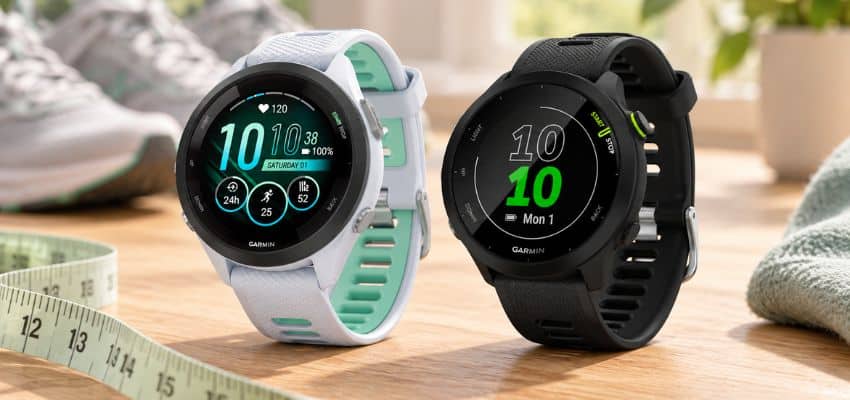
A first running watch should make an ordinary run easier to start, understand, and remember – not turn a gentle jog into a meeting with twelve blinking metrics.
Many new runners eventually ask, “What running watch do I need?” The honest answer may be a phone already in a pocket, a familiar smartwatch, or a simple GPS watch. The right device depends on the problem that needs solving now, not on the athlete someone hopes to become later.
The most useful running watch features for beginners are surprisingly modest: a secure fit, a readable screen, dependable time and distance, pace that can be understood without panic, enough battery for a normal week, and a simple path from wrist to phone. Heart rate, recovery estimates, maps, music, and safety tools can add value, but only when their limits are understood.
The goal is not to buy the most capable device. It is to choose the least complicated option that clears the line for the runs already happening.
Five things a first watch must get right
-
Comfort that disappears
The case and strap should stay secure without pinching, rotating, or demanding constant adjustment.
Look forA stable fit through an easy hourAvoidA heavy case or strap that rubs -
A readable run screen
Time, distance, and one useful pace field should be visible in a quick glance while moving.
Look forLarge numbers and simple screensAvoidTiny fields and deep menus -
A believable run record
The route and distance should remain reasonably consistent across familiar outdoor runs.
Look forReliable GPS after a confirmed lockAvoidRepeated route drift or missing sections -
Battery that fits real life
The watch should cover the usual week with room for a forgotten charge or a slightly longer outing.
Look forSeveral normal runs per chargeAvoidHeadline battery claims without GPS context -
A log that arrives safely
Saved activities should reach the companion app and any preferred running log without repeated repair work.
Look forSimple syncing and accessible recordsAvoidA confusing app or fragile connection
A watch does not become more useful because it can produce more opinions. For someone building a steady habit, a calm and trustworthy record of time, distance, pace, and effort is often more valuable than a dashboard full of scores.
Translate the specification sheet before comparing watches
GPS
Uses satellite signals to estimate an outdoor route, distance, and pace. It works best after the watch confirms a lock with a clear view of the sky.
Instant pace
A short-window estimate of current speed. It reacts quickly but can jump around more than lap pace or average pace.
Wrist heart rate
An optical estimate taken at the skin. Fit and movement can affect the reading, so the trend is usually more useful than one isolated number. A Stanford wearable study found that wrist devices measured heart rate more accurately than energy expenditure, but accuracy still varied among devices and activities.
GPS battery life
The expected runtime while actively recording with satellites. It is normally much shorter than battery life quoted for ordinary smartwatch use.
Cellular or LTE
A mobile connection that may support calls, messages, or alerts without the paired phone nearby. Carrier, country, plan, and model support still matter.
Recovery time
An estimate based on recorded data and device-specific inputs. It is context for the next demanding effort, not a medical verdict or an order to remain inactive.
Decide what kind of device belongs on the wrist
A phone may still be enough
A separate device is unnecessary when a phone already records route, elapsed time, and distance reliably. The phone is especially sensible for short, familiar routes where live pace is not needed and the runner already carries it for calls, music, directions, or safety. A person who mainly wants a weekly record may gain almost nothing from moving the same three totals onto the wrist.
The limitations appear in motion. Pulling out a phone to check progress can interrupt rhythm, rain complicates touch controls, and a loosely carried phone may bounce. A watch earns its place when a quick glance replaces that small but repeated nuisance. Notice the problem across several runs first; one awkward pocket on one unusual day is weak evidence for a new device.
An existing smartwatch can cover the first 5K
Apple Watch and similar smartwatches can record ordinary runs very well when the workout screen is clear, GPS is dependable on local routes, and battery life suits the owner’s charging habits. Notifications, calls, payments, and everyday apps may make one device more useful across the whole day. Familiar controls also have value: a watch already worn daily has no new strap, charger, app, or habit to learn.
The trade-off is usually less about whether a smartwatch can record a run and more about controls, battery, and focus. A dedicated running model often offers physical buttons, longer GPS use, and fewer distractions. Some smartwatch safety or communication functions also depend on a phone or cellular plan, so the familiar icon alone proves little. The practical comparison of smartwatch and running-watch needs helps separate a genuine limitation from the itch to buy something new.

A basic GPS watch removes the most friction
A dedicated entry-level GPS watch is often the cleanest answer for someone who wants to leave the phone alone, see time and distance at a glance, and keep a simple running history. It need not include maps, music, elaborate recovery scores, or dozens of activity profiles. The companion app matters almost as much as the case: an easy watch paired with a bewildering app is only half simple.
A good beginner running watch does the boring jobs without drama: it finds satellites, starts promptly, keeps the main numbers legible, saves the activity, and syncs later. Boring is a compliment here. Running already supplies enough plot twists.
A higher-end watch needs a job to do
More expensive devices become reasonable when a feature solves a repeated limitation: the battery cannot cover long outings, local routes genuinely require navigation, independent emergency contact matters, or several sports need to live in one reliable record. The requirement should be specific enough to test. “I may want more data” is vague; “I need the route visible during phone-free runs in unfamiliar places” is a real job.
Buying those capabilities for a possible future life is different. A feature that remains unopened has not future-proofed the watch; it has merely rented space in the menu.
Test the watch while moving, not while admiring it
The screen should answer three questions at a glance
At about minute twelve, novelty has faded and the watch has one simple task. A glance should answer: How long has this run lasted? How far has it gone? Is the current effort roughly where it should be?
Large numbers matter more than a beautiful watch face. Physical start and stop controls are valuable with sweaty fingers, sleeves, rain, or cold hands. A touchscreen can still work well, but the essential action should never be buried behind several taps. Check whether the watch can lock the screen, rearrange data fields, and prevent an accidental pause without turning setup into a weekend project.
Pace also needs the right presentation. Instant pace can jump even when effort feels steady, while lap pace or a short rolling average often gives a calmer view. Auto-lap can provide useful kilometer or mile summaries, but frequent alerts may become another form of nagging. Learning how to read running pace matters more than adding another data field.
Fit can improve both comfort and data
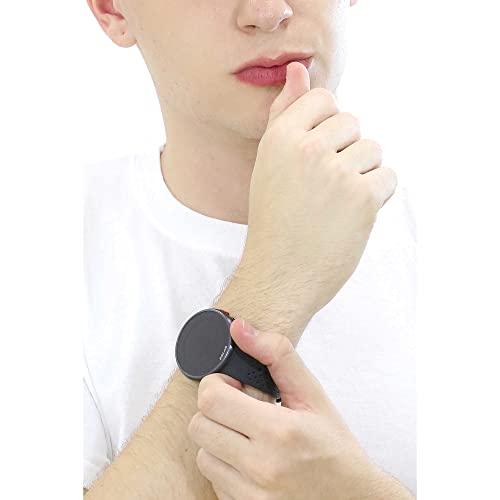
The case should not rotate around the wrist or press painfully into the hand when the wrist bends. Smaller wrists may need a shorter strap, a more compact case, or less weight rather than simply another hole in a long band. These small-wrist running-watch options show why listed dimensions do not tell the whole fit story.
A sensible return-window test is more revealing than a specification table: wear the watch for an ordinary hour, start an activity, read pace while walking briskly, press stop with one hand, and check whether the strap leaves irritation or demands adjustment. Repeat the test with the sleeve, glasses, and lighting normally used on a run. A bright shop display and a relaxed hand are generous exam conditions.
Let GPS describe the run without dictating it
A clean start begins before pressing Start
Buildings, covered porches, trees, and starting an activity too quickly can all weaken the opening part of a route. Let the watch confirm its satellite lock outdoors, then begin moving. A watch that regularly struggles can often improve through the simple checks in getting a faster GPS lock.
The goal is not survey-grade precision. For ordinary health-focused running, the record should be consistent enough to show recognizable routes, useful weekly totals, and broad changes over time. A simple accuracy test uses the same open route on two or three days. Similar results under similar conditions matter more than one perfect-looking map beside one chaotic map.
Live pace will flicker before it settles
A pace number that jumps for a few seconds does not mean the run has suddenly failed. Breathing, conversation, and the average across a longer segment provide better context than one instant reading. When watch pace keeps jumping, display settings and GPS conditions deserve attention before the runner does.
A strange map needs troubleshooting, not immediate replacement
One poor route can come from temporary signal loss. Repeatedly distorted maps deserve a controlled test on an open, known route after syncing and updating the watch. Compare the shape of the route before obsessing over the final decimal: cut corners and long sideways drifts reveal more than a tiny total difference. The steps for an inaccurate GPS track help distinguish settings and surroundings from a persistent device problem.
A watch and phone may still disagree slightly even when both are functioning. They can sample position at different intervals, smooth corners differently, and lose signal at different moments. Understanding why distance totals differ prevents a small discrepancy from becoming a courtroom drama between two gadgets.

Use heart rate as context, not a grade
Start with the strap before doubting the body
Wear the watch slightly above the wrist bone, snug enough to stay in place without restricting comfort. Cold skin, sweat, tattoos, loose placement, and arm movement can all affect an optical sensor. Look for a pattern that rises on hills and settles when effort eases rather than demanding agreement with another device beat for beat. An implausible trace should first lead to checking heart-rate fit, not to a conclusion about health or fitness.
A suspiciously steady high number may be cadence lock
Cadence lock often appears as a sudden high reading that closely matches step rate and stays oddly steady while perceived effort has not changed. Comparing heart rate with cadence and repeating the run after improving placement can help. The focused explanation of cadence lock on a running watch covers the signs without dismissing genuine symptoms.
Zones and recovery estimates become useful slowly
Default heart-rate zones may not fit every person. Several ordinary runs and a sensible maximum-heart-rate setting provide a better starting point than treating factory defaults as law. Setting simple heart-rate zones can make the display more meaningful once the basics feel familiar.
Recovery time is also an estimate, not a command to remain motionless until a countdown reaches zero. It is best read beside sleep, soreness, energy, recent effort, and unusual symptoms. A number that repeatedly feels disconnected from reality may reflect poor heart-rate inputs or a feature that simply adds no useful value for that runner. The explanation of Garmin Recovery Time helps keep the feature in its proper place.
Unexpected chest pain, faintness, severe breathlessness, or other concerning symptoms deserve stopping and seeking qualified medical guidance. The AHA heart-rate guidance advises emergency care when a suddenly very high or low heart rate is accompanied by symptoms such as chest pain, shortness of breath, dizziness, or fainting. A strange watch reading may be a sensor error, but the watch should never be used to rule out a health concern.
Judge everyday features by an ordinary week
Battery claims need a GPS reality check
For a few short runs each week, many current watches provide enough capacity. The more useful question is how much power remains after the actual combination of GPS, display, notifications, music, and syncing. Always-on display, screen brightness, maps, cellular connections, and cold conditions can change the result. A running-watch battery comparison should therefore separate smartwatch use from GPS recording.
A watch that once lasted comfortably and now fades early may have a setting, software, connection, or ageing-battery issue. Work through causes of rapid battery drain before replacing a device that may only need one noisy feature switched off.
Indoor tracks need known distance, not satellite optimism
Indoor tracks do not all share the same lap length, and changing lanes changes the distance traveled. Confirm the facility’s measured distance and lane, select an indoor or track mode when available, and compare the watch with counted laps. Manual lap presses can be more dependable than expecting wrist motion to recognize every circuit, especially with lane changes or crowded turns. The process for tracking indoor runs accurately explains when a manual record deserves more trust than an automatic estimate.
Safety icons come with conditions
Many watch alerts require a paired phone, mobile signal, permissions, supported contacts, or a paid service. Storing medical information is different from sending an alert, and automatic incident detection cannot guarantee that every event will be recognized. Check which emergency features work phone-free for the exact model, country, carrier, and plan.
Test the setup safely on a walk before relying on it. A charged phone when practical, route awareness, identification, and telling someone the plan remain important even when a watch offers reassuring buttons.

A saved run should arrive without a rescue mission
Before the return window closes, save a short test activity and confirm that it reaches the companion app. The app should make the record easy to find, inspect, and export. Check whether basic records remain usable without a paid subscription and whether account permissions are understandable. Runners who keep a Strava history can follow the steps to connect a running watch to Strava without turning a pleasant log into a public scoreboard.
Even a correct setup may occasionally delay or miss one activity. Garmin users can work through a Garmin-to-Strava sync failure and, where supported, upload the original activity file rather than assuming the run has vanished forever.
Set the budget after the requirements
-
Need now
The device solves a current problem with viewing, carrying, GPS recording, fit, battery, indoor use, safety, or syncing.
Look forA feature tied to repeated real runsAvoidBuying for a hypothetical future identity -
Useful later
The feature may matter as routes, duration, or everyday use changes, but it is not required for the present routine.
Look forA likely use with a clear time horizonAvoidPaying heavily for vague reassurance -
Can wait
The feature mainly adds more charts, modes, or duplication without removing any current friction.
Look forEvidence from several runs before upgradingAvoidConfusing a longer feature list with better value
An affordable device can still record dependable ordinary runs. The useful review question is where the compromises appear: GPS consistency, case size, display clarity, controls, battery in active use, app quality, or long-term support. Include the cost of a replacement strap, a proprietary charger, optional subscriptions, and any cellular plan rather than judging the box price alone. Some cheap GPS watches worth trusting may clear every line that matters.
Brand comparisons should use current models at similar prices rather than judging entire product families as though they never change. Garmin often appeals through a broad ecosystem and everyday features, while Coros models may appeal through a leaner experience and strong battery emphasis. Phone compatibility, app preferences, regional features, and the feel of the buttons may decide more than a small difference on a feature grid. A matched Garmin Forerunner and Coros Pace comparison makes the trade-offs concrete without declaring one logo universally superior.
Use the 12-minute, five-point filter
-
Read the essentials while moving
Start an activity and check whether time, distance, and pace are visible in one comfortable glance.
-
Wear it long enough to notice the fit
Keep it on for an ordinary hour and watch for rotation, pressure, rubbing, or a strap that cannot settle.
-
Test the longest realistic week
Estimate battery from actual GPS, display, music, cellular, and notification use rather than the largest headline number.
-
Save and sync one disposable activity
Confirm that the companion app and preferred running log receive the record before the return period ends.
-
Name the job of every paid extra
Keep a feature only when it solves a recurring need; an unnamed job is a good reason to leave it on the shelf.
The right first GPS watch should pass this test without requiring a manual, a subscription surprise, or a new personality.
Running watch FAQ
Do beginners really need a running watch?
No. A phone or an existing smartwatch can be enough for route, time, and distance. A dedicated watch becomes worthwhile when glancing at progress, carrying the phone, GPS battery, physical controls, or keeping a consistent log has become a repeated problem.
Which running watch features for beginners matter most?
Prioritize comfortable fit, a readable screen, reliable outdoor GPS, clear time-distance-pace fields, adequate battery in GPS mode, and dependable syncing. Heart rate, maps, music, recovery estimates, and advanced modes should come later when they answer a specific need.
Is a smartwatch or GPS running watch better for a first 5K?
A smartwatch often suits someone who values calls, apps, payments, and all-day use. A dedicated GPS watch usually offers simpler run controls, longer active battery life, and a more focused display. The better choice is the one that fits the whole week, not merely the race distance.
How accurate should a beginner running watch be?
Expect a reasonably consistent route and distance across familiar outdoor runs, not perfect corner-by-corner measurement. Confirm GPS lock before starting and judge patterns across several routes. Repeated large errors deserve troubleshooting.
Can wrist heart rate be trusted?
It can provide useful context when the watch fits securely and the reading broadly matches perceived effort. Motion, cold skin, loose placement, and cadence lock can distort it. Wrist data is not a medical assessment and should not be used to dismiss concerning symptoms.
How much should a first running watch cost?
Set the requirements first, then choose the least expensive model that meets them comfortably. Paying more is reasonable for a proven need such as longer GPS use, navigation, independent communication, a smaller fit, or a particular app ecosystem – not simply for more metrics.
The best first watch leaves room for the run
- Keep the phone or smartwatch when it already works.
- Prioritize fit, clarity, GPS, battery, and syncing.
- Treat heart rate and recovery scores as context.
- Pay for a feature only when it has a real job.
The answer to “What running watch do I need?” is not hidden in the longest specification sheet. It is found in an ordinary week: what gets carried, what is hard to read, where GPS struggles, how often charging is forgotten, and which records are worth keeping.
A dependable beginner running watch should reduce friction and then become pleasantly uninteresting. Choose the simplest device that records the runs clearly, fits the wrist kindly, and supports the habit already taking shape. The watch can count the kilometers; it does not need to become the reason they matter.