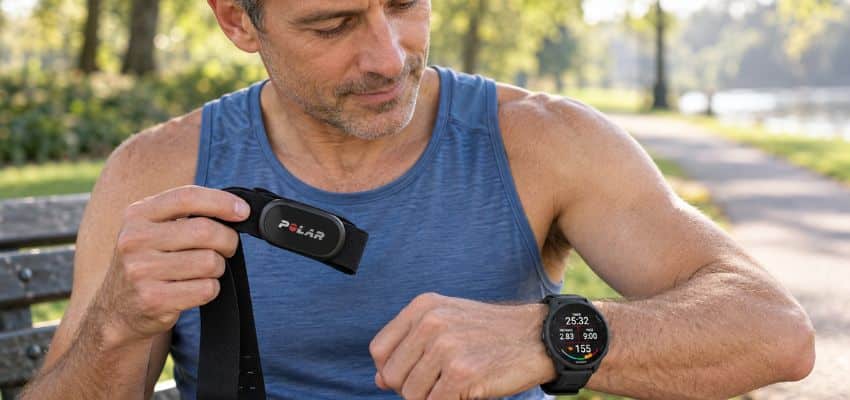
You are halfway through an ordinary easy run when the watch announces a much higher heart rate. Your breathing has not noticeably changed, and neither has the route. Then you notice something else: the displayed beats per minute are very close to your steps per minute.
That is a reason to check for cadence lock, not enough information to declare it. A watch heart rate that seems too high while running can involve movement-related measurement error, another sensor problem, or a genuine rise in heart rate. Similar numbers can also occur by coincidence.
The most useful next step is to compare the recorded heart-rate and cadence patterns over the same part of the activity. Where did they begin to overlap?
Did they keep moving together? Was the reading actually coming from the wrist sensor? Those questions tell you more than one alarming glance at the screen.
Whether you searched for “Garmin cadence lock” or noticed the pattern on another running watch, start with the evidence. You do not need a faster run, a forced step rhythm, or a new watch to begin checking it.
Stop exercising if you develop chest pain, unusual shortness of breath, or feel faint. Seek urgent help for severe or ongoing symptoms. Palpitations with chest pain, shortness of breath, or fainting require emergency assessment. Do not continue running to test whether a reading is false.
What cadence lock means when your watch shows a high heart rate
A wrist optical sensor uses light to detect changes associated with blood volume beneath the skin. Running introduces movement into that measurement.
When movement-related interference is mistaken for the pulse signal, the reported heart rate can follow a rhythm associated with your steps. Runners commonly call this cadence lock.
- Heart rate (bpm): heartbeats per minute, estimated from the wrist sensor or supplied by a connected sensor.
- Cadence (steps/min): your stepping rhythm, which describes movement rather than your pulse.
Your actual pulse has not become your step rate merely because the screen shows similar values. Nor should the phenomenon be described as a GPS failure or a watch deliberately copying cadence whenever it cannot find your pulse. The concern is the interpretation of a noisy optical signal.
Garmin’s optical heart-rate guidance describes cadence lock and emphasizes proper fit. The practical question for this article is whether your saved activity shows a suspicious pattern, and what you can reasonably do with that information.
Compare heart rate and cadence on the same timeline
Open the saved activity in the watch maker’s app or another platform that shows both metrics. If an overlay is available, use it. Otherwise, place the graphs side by side and align the same minutes. A screenshot of the final averages is not enough.
Look for a jump followed by sustained overlap
Find where the heart-rate trace first changes unexpectedly. Then inspect cadence before, during, and after that point. A sudden rise toward cadence followed by sustained tracking is more suggestive than two lines briefly crossing.
If small cadence changes are closely mirrored in the reported heart rate, keep that section for further checking.
Include context: a hill, a planned increase in effort, a stop, or an adjustment to the band. A rise after harder running can be genuine.
A jump with no obvious change in the outing raises a question, but it does not answer it. Breath and perceived effort provide context rather than an exact heart-rate measurement.
Check the graph axes, too. Two traces can look almost identical if the app scales them separately, even when their numerical values differ. Read the actual values at matching timestamps.
If one app reports cadence differently, confirm whether it is total steps per minute or another convention before comparing the numbers.
Matching averages or one matching number prove little
An average heart rate of 168 bpm and average cadence of 168 steps per minute do not show what happened during any particular minute. One metric might have varied widely while the other stayed steady. Even matching live numbers can be coincidental.
There is no universal “within five beats” rule or fixed duration that confirms cadence lock for every device and runner. Look at the repeated relationship between the traces. A flat heart-rate line alone can also reflect smoothing, delayed response, or another recording issue.
-
A brief match or similar averages
Two matching numbers do not show that one signal is following the other.
Check nextThe surrounding minutes and actual values at matching timestamps.Do not concludeCalling cadence lock from one glance or two averages. -
A jump followed by sustained tracking
A reported pulse that moves toward cadence and follows it deserves investigation.
Check nextA repeated relationship between the time-aligned traces, with context for effort changes.Do not concludeTreating the graph as proof of your true heart rate. -
A high reading without cadence tracking
Cadence lock is not clearly indicated. Other sensor problems or a real rise remain possible.
Check nextSymptoms, conditions, effort, and whether the issue repeats.Do not concludeDismissing a high value simply because it is inconvenient.
How to read a suspicious overlap without calling it proof
The following invented example shows what to inspect. It is not a real run, a normal heart-rate target, or a diagnostic rule.
| Part of an illustrative run | Cadence | Reported wrist heart rate | What to inspect |
|---|---|---|---|
| Before the unusual jump | 166–170 steps/min | 130–140 bpm | The two metrics are numerically separate |
| After the jump | 166–170 steps/min | Moves into the same range | The timing and context of the change |
| Following minutes | Varies slightly | Follows those variations closely | A sustained relationship raises suspicion |
| A different pattern | Changes little | Rises gradually during a hill | A real effort-related rise is possible |
No row reveals the runner’s true pulse. Read the surrounding activity and verify the data source before drawing a conclusion.
A suspicious overlap is a reason to check measurement quality. It does not reveal the correct heart rate, rule out a genuine high value, or determine whether symptoms are safe to ignore.
Keep the example separate from cadence advice. finding a comfortable running cadence concerns how you move. You do not need to force a different stride just to separate two lines on a screen.
What to do when a high reading appears during your run
First assess how you feel and reduce effort or stop safely if needed. Do not keep the same pace merely because you suspect the watch. If you are well enough to investigate the device, make the check while stopped rather than staring at the display on a busy path.
- Check contact: has the case slipped onto the wrist bone, rotated, or begun rocking?
- Reseat it comfortably: restore stable contact without pinching or restricting your wrist.
- Note the time: record roughly when you stopped or adjusted the band so the saved trace has context.
- Keep the conclusion open: a lower reading after stopping does not prove cadence lock; real heart rate can fall as effort decreases.
Comparing cadence and heart rate live can show you something worth inspecting later. It should not turn into a test involving sprints, exaggerated arm movements, or holding your arm stiff while running. The saved activity is usually a calmer place to examine the relationship.
If this happens indoors, responding to high heart rate on a treadmill includes the practical decision to reduce belt speed or stop. Device troubleshooting should not distract from managing the session safely.
Reduce wrist movement before the next easy-run check
Place the watch above the wrist bone with the sensor on bare skin. Adjust the band until the case stays put comfortably during ordinary arm movement. A universal number of tighter notches would be misleading; different bands and wrists need different adjustments.
Clean sensor buildup according to the manufacturer’s instructions, select the correct running activity, and warm up gently when your skin is cold. These are ways to improve the measurement conditions. They are not guarantees that cadence lock will disappear.
The full fit check for inaccurate watch heart-rate readings covers placement, contact, and broader sensor issues. Keep that investigation separate from this article’s main task: comparing the reported heart rate with the step rhythm.
-
Choose an ordinary easy outing
Use a familiar route and comfortable effort. Do not sprint or force a step rhythm to provoke the error.
-
Change one relevant factor
For example, move the watch off the wrist bone while keeping the band comfortable. Keep other settings consistent and note what you changed.
-
Mark the moments that matter
Note any stop or fit adjustment so you can find it in the saved activity. A fall after stopping cannot by itself prove a sensor error.
-
Compare the pattern afterward
Inspect time-aligned heart rate and cadence, especially the stretch that previously looked wrong. Save both activities if the overlap returns.
This is a practical comparison, not a calibration or a medical test. Do not continue through concerning symptoms.
A cleaner second recording is encouraging; a repeated pattern gives you more to discuss with support. Neither outcome turns perceived effort into a calibration standard. If unexplained readings continue, consider an independent comparison rather than tightening indefinitely.
Use an independent heart-rate recording when the pattern returns
A compatible electrical chest sensor offers another way to record heart rate without relying on optical measurement at the wrist. It can be useful when repeated suspicious overlap affects decisions you make during training.
Borrowing a suitable sensor may be enough for a check; owning one is not a requirement for being a recreational runner.
Confirm which sensor supplies the watch data
Pairing a chest strap can change the heart-rate source used by the watch. Some models also offer source-switching behavior. Check the manual and available settings for your exact model rather than assuming the wrist sensor remains the active source throughout the activity.
If the watch and phone both receive heart rate from the same strap, matching values are not a wrist-versus-strap comparison. You are viewing one source twice.
For an independent comparison, arrange for the optical wrist reading and external reading to be recorded separately, if your devices support it.
Prepare the strap and compare matching minutes
Follow the sensor’s wear instructions and check the connection before comparing recordings. Wear the Garmin HRM-Dual directly against your skin, just below the breastbone, with the strap secure enough to stay in place comfortably.
Confirm that it is connected to the device recording your chest-sensor data.

Look at the same minutes, not simply the final averages. If the independent recording behaves differently while the wrist reading follows cadence, that strengthens the reason to investigate the wrist measurement. It still does not diagnose a health condition.
An external sensor can have contact or connection problems too. If both recordings look strange, check the setup rather than automatically choosing the value you prefer. Save the original activities and a note of the sensor arrangement.
Hiding cadence or changing zones will not repair the measurement
Hiding a number does not remove movement-related interference in optical measurement.
The display and the quality of the sensor signal are different issues.
Zones classify a measured value; they do not repair it. Setting heart-rate zones on your running watch is a separate task.
Moving a boundary to make the activity look easier leaves the questionable data unchanged.
If the activity contains questionable heart-rate data, be cautious about interpreting estimates that may use it. understanding Garmin recovery-time estimates is a separate step.
Which estimates are affected depends on the device and feature; do not assume one bad section invalidates every metric or invent a correction for it.
Keep the original recording before editing anything. A platform’s ability to trim, hide, or remove a metric is not a way to recover your true pulse from a corrupted measurement.
A wrong map belongs to troubleshooting an inaccurate GPS track, which concerns position data rather than wrist optical sensing.
When to contact support or seek medical help
If the pattern keeps returning after normal fit, cleaning, restart, and update checks, send support evidence they can inspect:
- Watch model, software version, and selected activity.
- Which heart-rate sensor supplied the recording, including any source-switching setting.
- Example activities and screenshots aligned to the same minutes.
- What changed, what you tested, and whether the pattern repeated.
If you eventually need to reconsider equipment, the features a beginner running watch needs provides a practical starting point.
Compatibility with a preferred sensor may matter more than extra watch features. Replacement is a decision after investigation, not the first reaction to a spike.
Medical attention is a different route. A graph that resembles cadence lock should not be used to explain away chest discomfort, faintness, or unusual breathlessness.
The NHS guidance on palpitations identifies palpitations with chest pain, shortness of breath, or fainting as reasons for emergency help. Use the emergency service where you live; symptoms that have stopped can still require urgent advice.
If your watch heart rate seems too high while running, cadence lock is one possibility to check. Compare time-aligned heart-rate and cadence traces, look for sustained tracking, verify the data source, and test comfortable stable contact before drawing conclusions.
The goal is a useful record, not a verdict from one matching number. Keep uncertainty where the evidence is uncertain, and give the person wearing the watch priority over the graph.