An easy run feels ordinary until the watch supplies a number that does not. Perhaps your breathing is comfortable but the display suddenly climbs. Perhaps you have just run uphill and the heart-rate reading barely changes. Either situation can make you wonder whether to trust your effort, the watch, or neither.
When a running watch heart-rate reading seems inaccurate, check how the sensor sits against your skin before changing settings or buying another device. A loose case can shift with each arm swing; a watch perched on the wrist bone may not sit flat. Tightening until it hurts does not solve the problem either.
Fit is the first check, not the whole explanation. Cold skin, sensor buildup, the selected activity, and the limits of optical measurement can all matter. A genuine change in heart rate is also possible. Feeling comfortable gives you useful context, but it does not prove that a high number is false.
The aim is to make the next check clear: improve contact, test it during an easy outing, and know what to do if the disagreement continues. Your wrist does not need to become a small troubleshooting department every time you leave home.
Stop exercising if you develop chest pain, unusual shortness of breath, or feel faint. Seek urgent medical help for severe or ongoing symptoms; palpitations with chest pain, shortness of breath, or fainting require emergency assessment. Do not keep running while trying to prove the watch is wrong.
Find the bony bump near your hand, then place the watch on the forearm side of it. The sensor should sit against bare skin, rather than balancing on that bump or resting where the wrist bends. This is what “above the wrist bone” means in practical terms: farther from the hand, toward the elbow.
Move the watch a little if the case rocks or the edge catches when you bend your wrist. Do not turn a suggested finger-width distance into a rule for every wrist and every case. The useful result is a flat, comfortable position with consistent skin contact.
Garmin’s optical heart-rate guidance recommends placement above the wrist bone and a snug, comfortable fit that stays in place during exercise. Start with the manufacturer’s positioning instructions for your own watch.
A different person’s successful experiment is something to assess, not a guaranteed fix for you.

If a sleeve slips underneath, move the fabric clear. Wearing a sleeve over the watch is not automatically a heart-rate problem; the important question is whether it pushes the case or gets between the sensor and your skin. The sensor needs contact, not a view of the sky.
How tight should your watch be for heart-rate readings?
Aim for a case that stays in place while your arm moves, with a strap you can wear comfortably for the outing. There is no universal instruction to tighten two notches: strap holes, wrist shape, case size, and band materials vary.
Stop the watch sliding without pinching your wrist
Adjust the band gently, then swing your arm as you would while running. If the case slides toward your hand or rotates around the wrist, reconsider the position and fit. A stable sensor should maintain contact as your arm moves rather than repeatedly lifting away.
- Too loose
The case slides, rotates, or lifts enough to lose consistent sensor contact during ordinary arm movement.
- Comfortably secure
The case stays in position, the sensor rests against skin, and the band does not pinch or cause discomfort.
- Too tight
The band hurts, causes numbness or tingling, or feels restrictive. Loosen it rather than accepting discomfort for a reading.
Check again after you have moved for a while. A position that seems comfortable at the door may shift once you are running. Make any adjustment while stopped somewhere safe; there is no need to wrestle with a buckle while crossing a road.
Check whether the case fits your wrist as well as the band
If contact remains uneven, look at the case itself. Tightening a band cannot make every watch shape sit well on every wrist. A case that tilts despite a comfortable band may need a different position, a compatible adjustable band, or advice from the manufacturer.
The fit questions behind running watches for small wrists are relevant here. This is a reason to examine the fit you already have, not an automatic invitation to replace the watch. Keep the current band if it achieves stable contact comfortably.
Clean the sensor and select the correct Run profile
Before the next outing, inspect the back of the watch. Sunscreen or lotion residue can obstruct the optical sensor. Follow the manufacturer’s cleaning instructions; Garmin recommends fresh water and a soft cloth, then letting the device dry before wearing it again. Scrubbing with an abrasive cleaner is not a shortcut to a better reading.
Select the activity that matches your session, such as Run or the appropriate indoor running profile. Garmin explains that heart-rate calculations differ by activity type.
Starting the right activity is therefore part of the check; simply looking at an everyday heart-rate screen while exercising is not the same recording setup.
If the watch repeatedly shows no heart rate or behaves differently from usual, check whether wrist heart rate is enabled and follow the manual’s restart and update instructions.
Menu names vary. Save examples before taking a more disruptive step such as a reset, and do not assume every missing reading proves a broken sensor.
Zones categorize a reading. They do not make that reading accurate. Changing a zone boundary to make an alarming run look easier leaves the measurement problem unresolved.
Once readings are reasonably consistent, setting heart-rate zones on your watch becomes a separate task. Keep the order clear: check the measurement first, then consider how to use it.
Check why heart-rate readings spike, stay low, or disappear
Different patterns deserve different questions. Note when the mismatch starts, what you are doing, and whether it recurs. Avoid naming every high reading “cadence lock” or every low reading “poor fitness.” Neither conclusion follows from a number alone.
Sudden spikes may involve movement or cadence lock
If a reading jumps while the case is sliding, stop safely and restore comfortable contact. A reading that settles afterward gives you a clue about the setup, but it does not establish that every later value is correct. Save the activity if the pattern keeps returning.
Cadence lock occurs when optical measurement picks up a movement-related rhythm rather than the pulse. A heart-rate trace that follows step rate can be a clue. Similar numbers by themselves do not confirm it: your actual heart rate can sometimes be numerically close to your cadence.
Checking whether a high watch reading follows cadence needs its own comparison of the traces. Here, the immediate priority is stable contact and a repeatable observation.
Do not deliberately run harder to see whether you can force the numbers apart.
Cold starts and changing effort can confuse the first readings
Cold can reduce blood flow near the skin, making optical measurement harder. On a cold morning, warm up gently and reassess after your wrist has warmed. The warm-up is preparation for the outing, not a requirement to push through symptoms or an instruction to add a hard effort.
A delayed response during a change in effort is also different from a complete dropout. Optical readings may not reflect a rapid change immediately.
Do not accelerate because the screen still looks low, or treat a delayed rise as proof that the run has suddenly become dangerous. Slow or stop when needed and assess the situation.
Dropouts call for contact checks and a look beneath the sensor
If the value disappears, check whether the band shifted, fabric got underneath, or sweat allowed the case to move. Moisture is not automatically a fault; its practical effect may be that the watch slips.
Reseat it on clean skin and check the recording settings if the reading does not return.
Tattoo ink beneath the sensor can interfere with the light used for measurement. If practical, test the other wrist or a suitable tattoo-free position while preserving comfortable fit. Treat this as an individual check, not a promise that moving the watch will solve the problem.
| Pattern you notice | First check | What it does not prove |
|---|---|---|
| A sudden high value | Contact, effort, symptoms, and possible cadence overlap | That the number must be a sensor error |
| A low value at a cold start | Gentle warm-up and stable contact | That you should run harder |
| A delayed rise after effort changes | The timing of the change and the saved trace | That zones need changing |
| A blank value or repeated dropout | Contact, wrist-HR settings, sensor condition, and software | That replacement is the first step |
Test the adjusted fit on an easy run
Use a familiar outing at comfortable effort. You are testing the recording setup, not trying to prove your maximum heart rate. Keep the route and activity reasonably similar to a previous run so changes are easier to interpret.
- Note the original problem. Was it an early low reading, a sudden spike, or a missing value? Keep the activity rather than relying on memory.
- Make one relevant change. For example, move the watch off the wrist bone while retaining comfortable band tension. Do not change fit, wrist, software, and zones all at once just for a test.
- Start the correct running activity. Warm up gently and let the session remain easy.
- Look at the saved trace afterward. Check whether the same problem returns. Record when an adjustment or stop occurred.
A smoother graph is encouraging, but it is not a calibration certificate. Perceived effort and breathing provide context; they cannot establish an exact beats-per-minute value.
If consistent measurements matter to your training, an independent comparison can be more informative than deciding which graph looks nicer.
On a treadmill, a suspiciously low display is not permission to increase belt speed. responding safely to high heart rate on a treadmill concerns the session itself, while this fit check concerns the device. Keep those decisions separate and stop if you feel unwell.
Compare wrist readings with a compatible chest strap
A chest strap can be useful when wrist readings repeatedly disagree with the session or when you need a clearer record of changes in effort. Check compatibility before buying or borrowing one.
An electrical chest sensor measures a different signal from an optical wrist sensor, but it still needs proper contact and setup.
Prepare the strap before judging the comparison
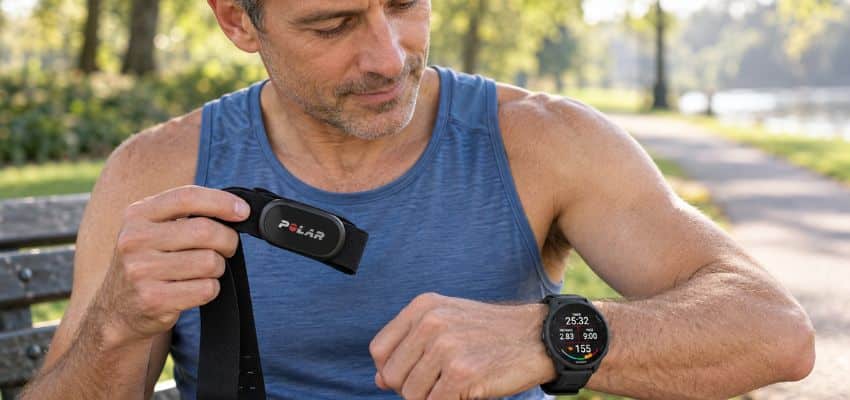
Follow the instructions for the exact sensor. For the Polar H10, wet the strap’s electrode areas and wear it against the skin with a comfortable secure fit. Dry electrodes or poor contact can make the comparison unhelpful; a second device deserves its own preparation.

Polar’s H10 setup instructions explain preparation and pairing. A compatible borrowed strap may be enough for a practical check. It does not have to become equipment you wear on every easy outing.
Confirm which sensor supplies each recorded heart rate
Once paired, a watch may use the external strap’s heart-rate data during the activity. If the watch and phone both display that same strap feed, matching numbers are not an independent check of the watch’s optical sensor. You are looking at one measurement in two places.
For a wrist-versus-strap comparison, the wrist reading must be recorded separately from the strap reading. Check whether your devices and apps allow that arrangement. Do not assume wrist optical measurement remains active merely because the watch is still on your arm.
Compare the same time periods, including the easy start and any changes in effort. A single simultaneous glance can miss delay or a brief dropout. The results can help troubleshoot fitness data, but neither consumer device should be used to diagnose symptoms.
What to do when fit changes do not resolve the problem
You have not failed the fit check because the first adjustment did not help. Some problems involve software, sensor limitations, or the device itself. The useful next step is specific evidence rather than another uncomfortable notch on the band.
- Device and setup
Watch model, software version, selected activity, wrist-heart-rate setting, and any connected external sensor.
- Observed pattern
A saved activity showing the spike, low value, or dropout, with approximate time and conditions.
- Checks already tried
Placement and comfortable fit, cleaning, an ordinary restart, available updates, and whether the pattern repeats.
Send these details to the manufacturer and follow model-specific advice. Avoid describing a watch as defective solely because one number felt implausible. Conversely, do not keep accepting large unexplained discrepancies simply because you have already tried the standard tips.
A wrong GPS route is a separate recording issue. checking an inaccurate GPS track can help when the map or distance looks wrong, but satellite settings do not fix optical contact at the wrist. Diagnose the metric that is actually causing trouble.
If replacement eventually becomes appropriate, start with the features a beginner running watch needs. Fit and external-sensor compatibility may matter more to your situation than collecting additional functions. A higher price does not guarantee a faultless reading on your wrist.
Do not dismiss symptoms as a watch error
A high reading with comfortable breathing and a high reading with chest discomfort deserve different responses. If you develop concerning symptoms, stop the run and seek appropriate medical help. Severe or ongoing symptoms should not wait for another device comparison.
The NHS guidance on palpitations advises emergency help for palpitations accompanied by chest pain, shortness of breath, or feeling faint or fainting. Use the emergency service where you live.
Repeated unexplained symptoms deserve clinical advice even if they have stopped by the time you look at the graph.
That does not make every odd watch value an emergency. It means the fit check belongs to troubleshooting a device, while symptoms belong to caring for the person wearing it. Do not let a low or apparently normal reading persuade you to ignore feeling unwell.
When a running watch heart-rate reading seems inaccurate, begin with placement above the wrist bone, comfortable steady contact, a clean sensor, and the correct activity. Then check whether the pattern repeats on an easy run.
If fit changes do not help, a properly prepared independent sensor comparison and clear examples for support can move the investigation forward. Your watch can offer useful information without getting the final word on how you feel.