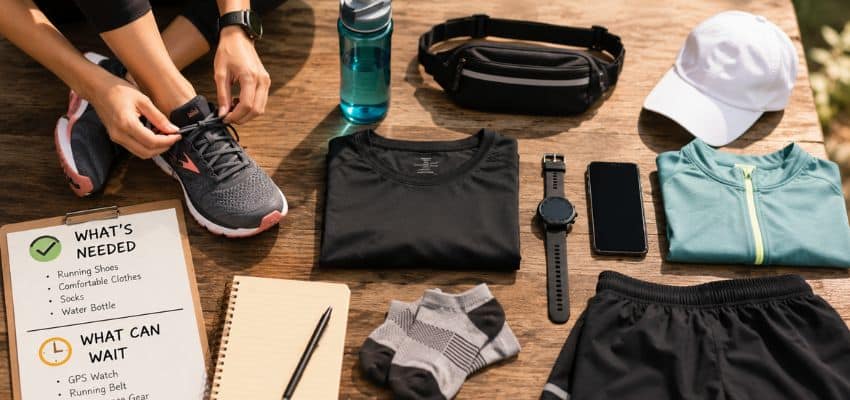
The best way to carry a phone is the one you stop noticing after the first few steps.
Learning how to carry phone while running is less about finding the biggest pouch and more about matching one secure method to the run. A phone that bounces against the thigh, pulls down a waistband, or stays clenched in one hand can interrupt an otherwise relaxed rhythm.
Start with the smallest option that holds the phone close to the body. A snug pocket may be enough for a short loop. An armband offers access without occupying a hand. A low-profile belt is often the most adaptable phone holder for running, while a vest makes sense when water, layers, or fuel join the load. The right choice also depends on phone size, clothing, sweat, rain, route, and how often the screen must be reached.
If the goal is to carry phone on a run without losing rhythm, test the complete setup in motion before trusting it on a longer route. Two minutes of jogging and turning will reveal more than ten minutes in front of a mirror.
- Use a snug zipped pocket when it holds the phone flat and does not pull clothing down.
- Choose an armband for frequent access, a belt for a phone plus small essentials, and a vest for a larger load.
- Test bounce, rubbing, sweat protection, and one-handed access before the real run.
There is no need to begin with a shopping list. First decide how much the run asks you to carry, how often the phone must be reached, and what movement has already caused trouble. Those three decisions narrow the options quickly.
Keep the phone close and the setup simple
The best carrier is not universal. It is the smallest secure option that suits today’s clothing, route, conditions, and load.
The first useful comparison is not between brands. It is between the demands of the run. A phone-only loop, a route that needs navigation, and a long outing with water and fuel should not be given the same storage solution.
Match the carrier to load, access, and conditions
-
Secure clothing pocket
The simplest answer for a phone-only outing when the pocket holds the device flat against the body.
Works well whenA deep zipped or close-fitting pocket that stays stable during a jog.Think twice whenA shallow opening, loose fabric, or a phone heavy enough to pull the waistband down. -
Hand carry or armband
Useful when directions, controls, or planned check-ins require more frequent access to the screen.
Works well whenA relaxed grip or a band that remains snug without pinching or rotating.Think twice whenA slippery phone, clenched hand, one-sided shoulder tension, or a band that rubs bare skin. -
Running belt
A practical choice when the phone shares the run with a key, card, tissues, or a small amount of fuel.
Works well whenA low-profile pouch that matches the load and stays close to the waist.Think twice whenExcess capacity, uneven packing, or a fit that needs repeated tightening. -
Running vest
Best reserved for longer, trail, hot, wet, or cold outings that also require water, fuel, or a removable layer.
Works well whenA snug reachable pocket and a vest that remains stable after bottles and layers are added.Think twice whenExtra warmth and bulk on a short run that only requires a phone.
Once the load is clear, begin with the least intrusive method. For many everyday runs, that means testing clothing storage or an armband before moving to a belt or vest.
Use a pocket or armband for a light load
Start with a secure pocket
A pocket is the least complicated way to carry a phone on a run when it is deep, secure, and close-fitting. A zipped side pocket, snug thigh pocket, or firm rear-waistband pocket can work without adding a separate strap. The phone should sit flat rather than pivoting from one corner, and the fabric should remain in place when the pocket is fully loaded.
Test the clothing with the phone and case inside. Walk quickly, jog, lift the knees, and make a few turns. A good pocket does not slap the leg, pull the shorts downward, or need a protecting hand at every curb. If an otherwise comfortable waistband starts slipping only after the phone is added, the weight – not necessarily the clothing size – is the useful clue.
Depth prevents an easy fall, but loose fabric can still let the phone swing. Look for both enclosure and stability. If the device migrates, rotates, or strikes the thigh during a short jog, use a closer pocket or a carrier that compresses the load.

Hand-carry only when frequent access matters
Holding the phone can be reasonable on a brief unfamiliar route where maps, a meeting point, or audio controls require frequent checks. It avoids a purchase and keeps the screen immediately available. Use a relaxed grip, a grippy case or hand strap, and switch hands occasionally before one forearm or shoulder begins doing extra work.
The weaknesses appear as the run gets longer or wetter. Sweat can make the phone slippery, a clenched hand can change arm swing, and looking at the screen while moving divides attention. Stop somewhere safe before reading a message or studying a map. If the phone is carried but rarely touched, keeping one hand occupied is solving a problem the run does not have.
Use an armband for attached access
An armband lets a runner reach the phone without holding it. It can suit navigation prompts, music controls, or planned check-ins, especially when clothing pockets change from season to season. The band should sit high enough to avoid the elbow, remain snug without rotating, and never be tight enough to cause tingling or numbness.
Large phones can make an armband feel top-heavy, while edges and closures may rub once sweat builds. Test it over the same bare skin or sleeve you expect to wear outside. A covered sleeve may reduce direct exposure to sweat or light rain, but damp plastic can make a touchscreen harder to use. An armband is still a phone-only solution; adding keys or fuel usually points toward a belt.

Run hands free with a belt or vest
Most runners who want to run hands free will end up comparing a belt with a vest. Both can keep a phone close while leaving the arms relaxed, but they solve different loads. A belt is usually enough for ordinary road runs. A vest becomes useful when the outing also requires water, layers, or several essentials.
Choose a belt by the load, not the number of pockets
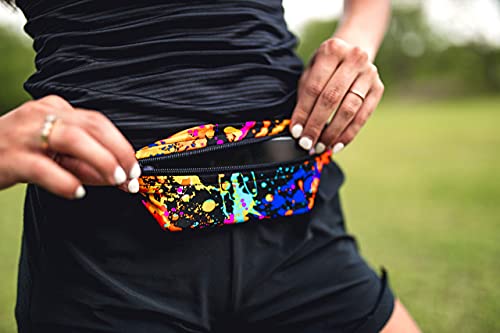
A slim belt is often the most adaptable phone holder for running because it works across shorts, tights, and light layers. Choose enough space for the phone and the few items the route genuinely requires. A belt that is too large lets the load move; one that is overfilled becomes rigid, presses into the waist, and strains the closure.
Place the phone flat and close to the body. Keep sharp objects away from the screen and skin. If a key must come along, use a clip or separate pocket and follow a method for carrying keys without bounce or sharp contact. The sentence remains useful even while an unpublished NodeLink displays only as text: separation protects the phone, quiets the load, and makes the key easier to find.
Read the movement clues correctly
- Bounce
The phone or carrier repeatedly leaves and strikes the body. Reduce empty space, move weight closer, or choose a smaller carrier.
- Waistband pull
Phone weight distorts the clothing even if the pocket stays closed. Use more supportive clothing or transfer the load to a belt or vest.
- Rubbing
An edge, seam, strap, or device repeatedly contacts one point. Reposition it, add a suitable fabric layer, or change the carrier before distance magnifies the irritation.
- Access friction
Checking or returning the phone requires repeated slowing, twisting, or two-handed adjustment. Prepare controls in advance or choose a more reachable position.
- Grip tension
Hand-carrying causes the fingers, forearm, or shoulder to stay tense. Relax the grip, switch sides, use a strap, or move the phone off the hand.
Fix belt bounce before replacing the belt
A bouncing belt does not always mean the product is wrong. It may sit too low, be too loose, hold more capacity than the load needs, or carry the heaviest item away from the body. First reduce the contents, flatten the phone, and adjust the belt at the waist or upper hips. If it still moves, use the checks for stopping a running belt from bouncing before buying another carrier.
A belt should stay close without restricting breathing or digging into the waist. If excessive tightening is the only way to stop movement, the pouch may be too large, the load may be uneven, or the belt may not match the runner’s body and clothing.
Move to a vest when the route carries more
A vest earns its extra structure on long road runs, trail routes, outings without easy water access, or changing conditions that require a layer. A snug chest or side pocket can keep the phone more stable than a roomy belt, while the remaining pockets distribute water, fuel, and clothing across the torso.
Load the vest before adjusting it. Bottles and a packed jacket change the fit, and a pocket that feels secure while empty may flap once other items shift. Tighten the side and sternum straps until the load remains quiet without squeezing the chest. A vest is rarely worthwhile solely to carry one phone on a short, mild outing; more fabric is not automatically more rhythm.

Protect the phone without creating distraction
Separate sweat resistance from waterproof protection
Sweat can collect inside waistband pockets, armband sleeves, and vest compartments even when rain never falls. Face the screen inward only if the pocket material and closure do not trap more moisture against it. A thin water-resistant sleeve or sealed bag can add a barrier, but it should not be described as waterproof unless its actual rating and closure support that claim.
In sustained rain, access and protection pull in opposite directions. A phone buried beneath layers stays drier but becomes harder to reach; an exposed screen is convenient but vulnerable. Decide before leaving whether the phone is mainly recording, navigating, playing audio, or providing emergency contact. That job determines whether quick access or stronger protection deserves priority.
Set controls before the first step
Start the run, route, playlist, or audio prompt before moving. Use voice cues, lock-screen controls, or planned stopping points when they reduce the need to handle the phone. A carrier cannot preserve rhythm if the runner opens it every few minutes. When frequent live data is the real need, that repeated friction may be evidence for a wrist device – but the phone remains perfectly adequate when post-run totals are enough.
Practice removing and returning the phone with one hand while standing still. If the closure takes two hands, the screen catches on the pocket edge, or another item falls out with it, reorganize the load. The safest response while running is still to stop in a visible place before reading or typing.
Match access to low-light and solo routes
A reachable phone can support navigation or contact, but it does not make a route safe by itself. For early or late outings, keep the device accessible without covering reflective gear or a running light chosen for the route. On unfamiliar or isolated routes, tell a trusted person the plan when appropriate and keep identification separate from a locked phone.
A method can sound suitable on paper and still fail once the body begins moving. The final decision should therefore come from a short test with the exact phone, case, clothing, and other items planned for the run.

Test the complete setup before the run
-
Load exactly what will leave the house
Include the phone, case, key, card, fuel, water, and expected clothing layers. An empty carrier cannot reveal how the real load will behave.
-
Move for two minutes
Walk briskly, jog, climb steps, swing both arms, and make several turns. Listen and feel for thudding, jingling, rubbing, waistband pull, or altered arm movement.
-
Use the phone once
Reach it, glance at the intended screen, and return it without letting another item escape. Do this while standing still; the test is about access, not practicing distracted running.
-
Change one variable
Reposition the carrier, remove one item, tighten slightly, or separate the phone and key. Changing one factor at a time shows which adjustment actually solved the problem.
-
Take a short familiar loop
Use the final setup for ten easy minutes close to home before trusting it on a long run, race, or unfamiliar route. If it needs two adjustments in ten minutes, it has not disappeared yet.
This same test helps decide whether a new carrier is necessary. The broader running gear a beginner actually needs should grow from repeated problems, not from the assumption that every runner needs every accessory.
After that test, most choices become simple: keep the setup that stays quiet, or correct the one specific failure you noticed. The remaining questions usually concern phone size, moisture, access, and whether the device needs to come at all.
Phone-carry questions
What is the best way to carry a phone while running?
The best method is the smallest secure option that fits the phone, clothing, route, and load. Test a snug zipped pocket first. Use an armband for frequent access, a belt for the phone plus small essentials, and a vest when water or layers also need to come.
How do I run hands free with a large phone?
A close-fitting belt or a supportive thigh pocket usually handles a large phone better than a shallow shorts pocket. Keep the phone flat against the body and test whether its weight pulls clothing down. A vest is reasonable only when the rest of the load already justifies one.
Is a phone holder for running better than a pocket?
Not automatically. A secure pocket is simpler and costs nothing when it stays stable. A separate holder becomes useful when the pocket lacks a closure, bounces, sags, rubs, or cannot separate the phone from keys and other items.
Can sweat damage a phone during a run?
Sweat can enter an exposed or poorly protected pocket, so use a suitable sleeve or protected compartment when moisture is likely. Water resistance varies by phone and carrier; do not assume a fabric pocket or plastic window is waterproof.
Should I carry my phone on every run?
No single rule fits every route. A short familiar loop close to home may not require it, while navigation, contact access, audio, medical information, or a solo outing may make it useful. Decide by the run rather than carrying it automatically.
The carrier has done enough when it stops asking for attention. If the phone remains secure, the arms stay relaxed, and access is available without repeated adjustment, there is little reason to make the system more complicated.
Make the carrier disappear
- Start with a secure pocket before buying a separate carrier.
- Use an armband for access, a belt for small essentials, and a vest for a genuinely larger load.
- Solve bounce, rubbing, moisture, and access problems during a short test – not halfway through a long run.
The practical answer to how to carry phone while running is not one universal product. It is a setup that keeps the device secure, leaves the arms relaxed, and asks for no repeated adjustment. On one day that may be a zipped pocket; on another it may be an armband, belt, or vest.
Load the exact items, test them in motion, and take one short familiar loop. When the phone stops announcing itself at every stride, the method is doing its job – and the run can return to being the interesting part.